 ClockIN
Your business, in two minutes.
One private link on your phone. Sales, crew cost and profit, month by month, and what needs you today.
You own the business. You do not want to read payroll. You want to know three things: is the month going well, is anything off, and does anything need me?
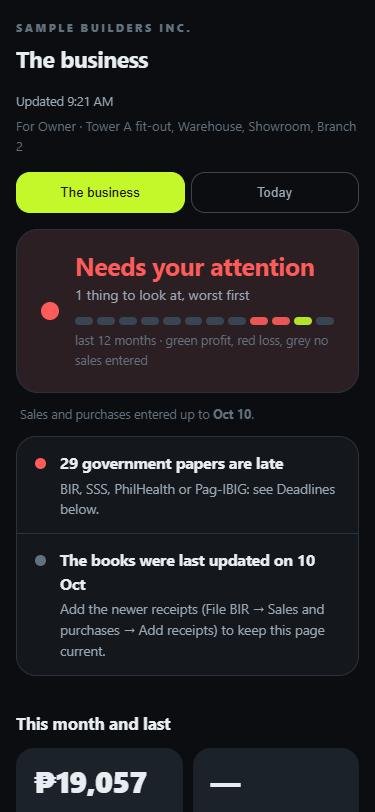
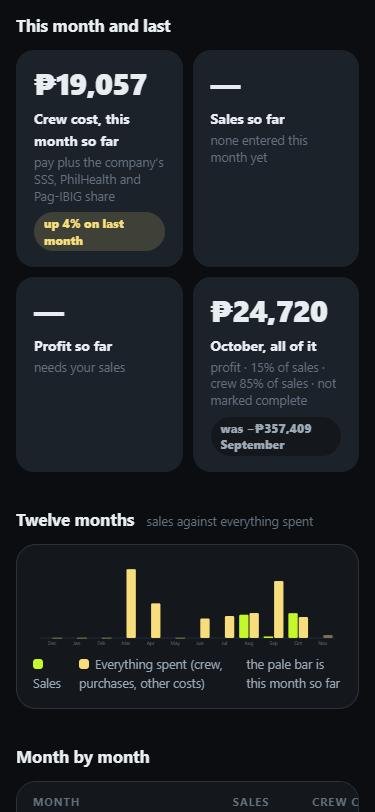
The boss page on a phone. A sample company with sample numbers.
What the boss page shows
- A status at the top. All steady, Worth a look, or Needs your attention.
- The few things to look at, worst first. Crew cost running up, profit lower than last month, a month below zero, too much overtime, a site over its labour budget, staff who are often late or absent, cash advances growing, papers that are late.
- This month and last. Crew cost, sales and profit, with the change.
- Twelve months at a glance. A chart, a month-by-month table, and the year so far. Twelve small blocks show each month: green made a profit, red lost money.
- Today. Who is in, who is late, who has not clocked in yet.
- Phone requests. When someone asks for a cash advance or a certificate on their phone, you see who, what and how much, and you can say Yes or No. No answers it for good and they see why. Yes tells your office, which sets the amount and the payback. Nothing is paid from that page.
How the profit is worked out
Profit is sales, less crew cost, less purchases, less any other costs you type in. Sales and purchases come from the list your bookkeeper or you keep for the BIR (File BIR). Crew cost is the pay plus the company’s share of SSS, PhilHealth and Pag-IBIG, from the clock-ins. A month with no sales entered shows no profit. Nothing is guessed.
What it never shows
No photographs and no locations. It is a read-only page: it cannot change anybody’s pay. You can switch the link off at any time, and make a new one.
Questions
Does the owner have to log in?
No. The boss page is a private link. Keep it private, like a key. You can switch it off from the console and make a new one any time.
Can the owner change anything?
Only the Yes or No on phone requests. Pay, hours and records cannot be changed from the boss page.
How do the sales get in?
Sales and purchases are added in File BIR, from receipt photos or an Excel list, at any time in the month. Mark a month complete when it is done and the page calls it final.
Try it with your own crew
Sign up, name your site, print the poster. Free through your first full pay period, no card, nothing to install.