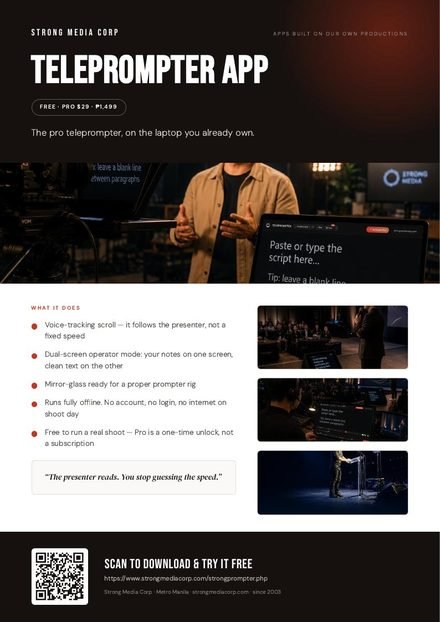
Voice-tracking in English, Filipino or Taglish, mirror-glass, dual-screen and captions — the full prompter is free to use, any length. Pro adds a phone remote, a floating window for Zoom and HD Camera Mode — ₱1,499, paid once. Not a subscription.
Opens in this browser. No sign-up, no install, nothing to wait for.
Runs in your browser — best in Chrome or Edge (Safari on iPhone/iPad). No install, no account.
Coming back to it? There is no account and no password — the key you were emailed is typed inside the app itself.
Prices are in Philippine pesos, cover what is listed, and can change at any time. The price you are shown at checkout is the price you pay.
Purpose-built for live events, TVC shoots, church, classrooms and creators.
Scan a code and your phone runs the show — play, pause, speed, and every section one tap away. Nothing to install on the phone. Try it free on short scripts.
A small window with your script stays on top of Zoom, Google Meet or Teams. Put it right under your webcam and keep eye contact the whole call.
The script follows your voice in English, Filipino or Taglish — it pauses when you pause and catches up when you ad-lib. Free.
Your phone, tablet or webcam becomes a prompter and a camera, recording in 1080p. The text never shows in your video. Free to 150 words; Pro for any length.
Controls on your laptop, clean text on a second monitor or tablet for the talent — perfectly in sync, with an optional on-screen timer. Free.
Flip the text for beam-splitter rigs over the lens, so talent reads straight to camera. Free — some apps only offer this on a paid plan.
Every # heading becomes a numbered button on the edge of the screen. Off-sync? Grab the text with your mouse and pull it back — it glides to a soft stop. Free.
Describe the speech and ChatGPT or Claude writes it — already laid out with sections, stressed words and pauses. Paste it straight in. Free.
Bold, dimmed [notes] that aren’t read, /// breath breaks, a 3-2-1 roll-in, a live clock — and auto-speed to land the script in an exact time. Free.
Get a matching subtitle file timed from the scroll, or from your voice while you record. Caption your video with zero extra work. Free.
Any text and background colour, your own brand font, plus Atkinson Hyperlegible and a dyslexia-friendly font built in. Free.
Keeps the screen awake, runs without internet, and takes Bluetooth clickers, foot pedals and Xbox or PlayStation controllers. Word import, library and backup included. Free.
Controls on your laptop, clean scrolling text on the confidence monitor — the operator and the talent each see exactly what they need.
Three steps — no training, no setup drama.
Drop in your script, or import a .docx / .txt / .rtf. Add simple cues like # headings and [notes].
Set speed, font, width, colour and the eye-line marker — with a live preview before you roll.
Scroll by hand, wheel, clicker — or let voice-tracking follow the talent. Mirror it for the glass.
Flip the text for a beam-splitter rig over the lens — talent reads naturally, straight to camera.
The full prompter is free to use — voice-tracking, dual-screen, mirror-glass, captions, cues, the lot. Go Pro once for the phone remote, the Zoom overlay and Camera Mode. Not a subscription.
Most teleprompter apps are subscriptions. Here’s how we line up against the popular ones — using their own published prices.
| Feature | Teleprompter Appby Strong Media | Teleprompter.comPro plan | PromptSmartStarter | Teleprompter ProApps Ltd | GhostPrompter |
|---|---|---|---|---|---|
| Price | ₱1,499 once | ≈ ₱1,250/mo or ≈ ₱5,630/yr | ≈ ₱625/mo or ≈ ₱6,250/yr | ≈ ₱3,750/yr or ≈ ₱10,010 once | ≈ ₱3,060 once |
| Try before you buy | Free to use, any length | Free plan — watermarked recordings, no mirroring | 7-day trial | Free plan | 14-day trial |
| Works on | Any browser — Windows, Mac, iPhone, iPad, Android | iOS, Android, Mac, web | iOS, Android, Windows, Mac | iPhone, iPad, Mac | Windows, Mac |
| Mirror for teleprompter glass | ✓ Free | Paid plan only | ✓ | ✓ | Not listed |
| Voice-follow scrolling | ✓ Free | ✓ | ✓ | Not listed | ✓ |
| Phone / remote control | ✓ Pro | ✓ | ✓ | ✓ Paid plan | Not listed |
| Floating window over video calls | ✓ Pro (Chrome, Edge) | Not listed | Not listed | ✓ Mac | ✓ |
Prices and features are from each company’s own website (September 2026). They publish in US dollars; pesos and euros are converted at 23 Sep 2026 rates and marked ≈. Our Pro is charged in pesos — your bank converts. “Not listed” means we couldn’t find it on their site — not that it can’t do it. Always check before you buy.
₱1,499 (about US$24 or €21) costs less than one year of the main subscription plans — and there’s nothing to renew.
Voice-tracking, dual-screen and mirror-glass cost nothing. Teleprompter.com keeps mirroring for paid plans.
It opens in a browser on Windows, Mac, iPhone, iPad or Android. No account, no app store.
Filipino and Taglish voice-tracking, works on venue laptops with no Wi-Fi, and a local crew who can rent you the full rig.
The full prompter is free to use, any length. Pro is a one-time unlock for the phone remote, the floating window and Camera Mode — not a subscription.
Best for: everyone — it’s genuinely free
Best for: operators, presenters & creators
Best for: agencies & AV houses
One-time price, no subscription. Also available: Teleprompter rental with operator & glass rig. See rental →
📦 Also call live shows? Get the Producer Suite (save ₱600). · Prefer direct GCash / PayPal, or buying for a team? Message us.
One-time payment — no subscription, no auto-renew. Your key is emailed within minutes and works offline. Try the free version first. Licence & refunds →
A floor-standing confidence monitor for the speaker, in sync with the operator's screen — same words, same pace, no surprises.
 One-pager
Download PDF
One-pager
Download PDF